
Employee photo consent means getting a real, informed yes from each person before their event photos appear on LinkedIn, your careers page or a paid ad, and making it just as easy for them to say no or change their mind later. In practice you need three things: a usage tier for every photo, a visible opt-out system at the event, and a consent log that someone checks before anything is published.
Great culture photos are gold for recruitment. But the same photo can upset the person in it, and HR often sits between a marketing team that wants to post today and a legal team that says "not yet". Both are partly right, and the fix is a routine rather than a single form.
Schools already run this kind of routine for students through a school photo opt-out. Workplaces need the same discipline with one extra twist: the people in your photos depend on you for their income.
Not legal advice
This guide is practical, not legal advice. Rules differ by country and, in the US, by state. Check your final process with your legal team before you rely on it.
Why "they work here" is not the same as consent
An event photo of a recognisable person is personal data. Ireland's Data Protection Commission (DPC) states that images of individuals are personal data under the GDPR, the EU General Data Protection Regulation. Using them needs a lawful basis, like any other staff data.
The obvious basis is consent, and that is where the employment relationship causes trouble. The UK Information Commissioner's Office (ICO) explains that consent is not usually appropriate where there is a clear imbalance of power, because people who depend on you may feel they have no real choice. An employee asked by their own manager to sign a photo release fits that description.
The European Data Protection Board (EDPB) goes further. Its guidelines on consent say employees can only give free consent in exceptional circumstances, when saying yes or no has no adverse consequences at all. One of its examples fits event photography closely:
A film crew is going to be filming in a certain part of an office. The employer asks all the employees who sit in that area for their consent to be filmed, as they may appear in the background of the video. Those who do not want to be filmed are not penalised in any way but instead are given equivalent desks elsewhere in the building for the duration of the filming. European Data Protection Board, Guidelines 05/2020 on consent, Example 5
So consent can work at a company event only if saying no is easy and costs the person nothing. If it cannot, your legal team may prefer another lawful basis, usually legitimate interests. The ICO describes a three-part legitimate interests test: is your purpose legitimate, is using the photo necessary for it, and do the person's rights outweigh it?
Legitimate interests does not remove the right to say no. When someone objects, the ICO says you must stop unless you can show compelling legitimate grounds that override the person's interests. A recruitment post rarely clears that bar.
In the US the rules look different. As SHRM (the Society for Human Resource Management) notes, no federal law stops an employer using an employee's photo for business purposes, but some states have right-of-publicity or right-of-privacy laws.
Employee photo consent works best in three usage tiers
A crowd shot on the intranet is not the same as one person's face on a paid recruitment ad that runs for two years. Put every planned use into a tier, and the tier tells you what permission you need.
- Internal only. The intranet, the staff newsletter, a private gallery for people who attended. Staff can reasonably expect this, so a clear notice and an easy opt-out usually cover it.
- Owned external channels. The company LinkedIn page, the careers site, recruitment brochures, slides for a public conference. The audience is now the public, and anyone can screenshot and share the image. Ask for this tier specifically, and treat a no as final.
- Paid and long-life use. Paid social ads, job board banners, print campaigns, anything with a media budget or a shelf life of months. Get written permission for that exact use, naming the campaign and how long it will run.
The third tier matches advice employment lawyers gave SHRM: a general release signed when someone joins may not cover an advertising campaign, so ask for written consent specifically for that use. The same article suggests letting employees withdraw at any time.
Inside every tier, separate featured people from incidental ones. A person at the centre of the frame needs their choice checked. A tiny figure at the back of a wide stage shot is lower risk, but anyone who opted out should not appear recognisably in anything you publish.
How to set up a photo opt-in system at a company event
The aim is simple. Every person makes a choice before the event, the photographer can see that choice in the room, and nobody has to explain themselves.
Ask at registration, with nothing ticked for them
Add one question to the event registration form. Say where photos may appear, and offer three plain options with none selected by default:
- Yes, photos of me can be used internally and on company channels.
- Internal use only, please.
- Please do not photograph me.
Leave paid campaigns out of the form. When you want to feature someone in an ad, ask them separately after the event, with the actual photo in front of them. Keep a copy of the form wording, so you can show later what people agreed to.
Make the choice visible on the day
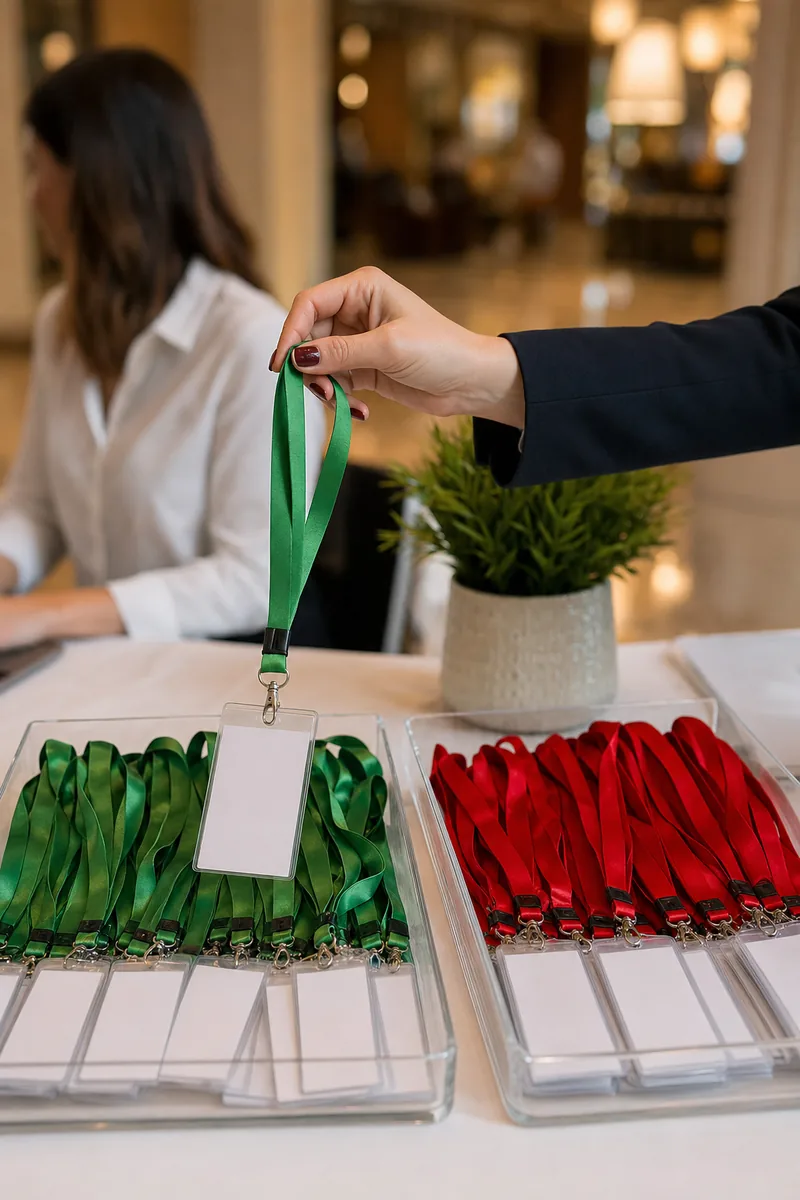
A registration list does not help a photographer working a room of 300 people. They need to see the choice from a distance. The DPC suggests exactly this for conferences: green lanyards for people who agree to photos and red for those who do not. Coloured stickers on name badges do the same job more discreetly.
Brief the photographer before doors open. Explain what each colour means, and that red means no photo at all, not "keep them in the background". Ask them to delete accidental frames of red-lanyard guests during their first edit, so those images never reach the shared set. Keep spare lanyards of both colours at the desk, because some people change their minds on arrival.
Set up a no-photo zone
Follow the spirit of the EDPB film-crew example and give people who opted out an equal place to be. That means a table with the same view of the stage, seats near the food, and a coffee point the photographer does not shoot. It should never feel like a corner for people with something to hide. Keep the photo wall, the stage steps and the award handover well away from it.
Tell everyone what happens next
Put a short notice at the entrance and in the joining email: photos are being taken, why, where they will be used, and who to contact to opt out later. The DPC recommends written notices at larger events for this reason.
What goes in a consent log
A consent log is the record that links each person to their photo choice. A spreadsheet with restricted access is enough for most teams. For each person, record:
- Name and team.
- The event.
- Their choice: company channels, internal only, or no photos.
- How and when they gave it, including the form version.
- Any separate permission for a paid campaign, with the campaign name and end date.
- The date they withdrew, if they did.
- What was removed after the withdrawal, and when.
The log only protects people if someone checks it, and that check is what turns employee photo consent from a promise into something you can prove. Make one rule: before any event photo leaves the intranet, one named person matches every recognisable face against the log. Most slips happen here, when a popular internal photo is reposted on the company page by someone who never saw the list.
Keep the log itself private. A list of people who asked not to be photographed is sensitive in its own right, so share it only with the people who need it, such as the photographer and the comms lead.
How to keep non-consenting employees out of the shared gallery
The riskiest moment is often not the LinkedIn post. It is the day after the event, when someone drops all 1,200 photos into a shared folder. Now every colleague can download a picture of the person who wore the red lanyard, and some will post it.

A private gallery for each person avoids that. In Lenzeit's secure invite-only mode, staff are registered before the event and each one receives their own access code. Lenzeit matches each photo to the faces in it, so each employee opens a gallery that holds only the photos they appear in, with no app and no account. Nobody browses the rest of the event, which is the real difference between face-based event photo delivery software and a shared drive.
For people who opted out, FaceLock™, included with the Pro and Premium plans, lets the event owner lock a person's face. Photos that contain a locked face, group shots included, are then kept out of the galleries other people can open.
FaceLock controls delivery. It does not blur.
FaceLock decides which photos reach people through the gallery. It does not blur, crop or edit an image, and the original files stay with the photographer or event owner. Your marketing team still needs the consent log before it chooses anything for public use.
If you want to publish a group shot and one person in it opted out, the honest options are a different frame, a crop, or a manual retouch in your own editing software. For recruitment material, a different frame is usually best. A blurred face in the middle of a team photo draws the eye and invites questions.
What to do when an employee withdraws consent
People change their minds, leave, or simply dislike a photo. The EDPB says withdrawing consent should be as easy as giving it, and that after a withdrawal earlier use stays lawful but the processing must stop. In practice, when someone asks:
- Confirm and log it the same day. Do not ask for a reason.
- Remove the photos from channels you control: the careers page, intranet banners, pinned posts on the company page.
- Flag the photos in your image library so nobody picks them for the next campaign.
- Tell everyone who holds a copy: your agency, the recruitment team, whoever built the event recap deck.
- Check paid campaigns that feature the person, and ask your legal team how quickly the creative must be replaced.
- Lock their face in any event gallery that is still open, if your delivery platform supports it.
Be honest with the person about the limits. A company post that was reshared hundreds of times cannot be pulled back from every feed. You can delete your own post and stop using the image, which is usually what they want.
Leavers need a rule of their own, written before anyone leaves. For example, photos of former staff come off the careers page at the next quarterly refresh, or sooner if they ask.
Pre-publish checklist for employer branding photos
Run this before any event photo leaves the intranet:
- ✓Every recognisable face has been matched against the consent log.
- ✓The planned use fits the tier each person chose.
- ✓Anyone featured in a paid or long-running campaign gave separate written permission for it.
- ✓Nobody who opted out or withdrew appears, even in the background.
- ✓Children at family days are handled under your stricter policy for minors.
- ✓A second person, not the one who picked the photo, has signed it off.
- ✓You know who handles removal requests, and how fast.
Consent for company photos is a routine, not a form. Tiers decide what you ask for, the event setup makes saying no easy, and the log gets checked every time. Get those three right and your employer branding gets real culture photos without spending staff trust to get them.